
 This is post 2 of 5 in a series called “5 Tips to Increase your Blog Traffic“.
2. Commenting
Today we’ll be looking at how comments can increase your traffic immediately, and long term to your blog.
So you want some information from one of my personal blogs as to just how much traffic can come from posting comments to a popular blogs?
How about some screenshots of some of my recent comments and their effect from just one of my sites: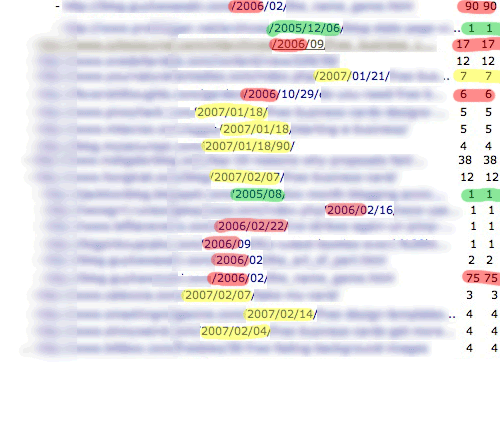
The Green represents 2005, Red 2006 and Yellow 2007.
This is only traffic from comments to one of my smaller sites. These are from January and February. Look at a few of those from 2006. One still sent me 90 visitors, one 75 visitors and the other 17 visitors! Those are from comments over 8 months ago!
If you notice the green highlighting, I’m still receiving traffic from comments in 2005 as well.
The value is pretty obvious here, so let’s talk about how to achieve results like this.
Here are three ways to make sure your comments send visitors back to you and increase traffic (as well as great links):
1. Don’t comment spam.
This means that you are commenting with a purpose, to enhance the blog. You are leaving comments that are constructive and appreciated. You are NOT leaving comments like, “Cool, good post.” Or, “I’ve never thought of that, thanks!” That is just comment spam that gets deleted. If you ask a question in your comment you’re more likely to get approved and the blog owner will probably respond as well.
2. Get there quick!
If you don’t post one of the first 3 comments, you can forget about getting much traffic. Comments are kinda like a Google search page. After the first few results, most people stop reading and find somewhere to click, or something else to do. If you are commenter #50, don’t expect any traffic to come from that.
Here is a trick for getting to a blog before other commenters do. Sign up for RSS feed notification whenever a new post comes up. Most RSS feed readers will send you a short email when you have a new post to read. Once that email hits your inbox, go to that blog immediately and start your comment.
3. Use Your Name.
I can’t tell you how often I delete good comments because the commenter used his anchor text instead of a name. Unless your website is something like, “KingOfWidgets.com” and you post your name as “Widget King” or even “King of the Widgets” you’re getting deleted. Nobody likes comment spam, see #1.
3a. Look for Direct Links.
Before you invest the time in filling out the comment form, make sure you are going to get a link. If there are 10 comments and none of them have links, the blog owner probably strips all the links. Skip that blog.
3b. Comment on Old Posts.
Many people, myself included, don’t mind reading comments on old posts. Some people don’t like it, and I understand both sides. Once you feel that you have exhausted all of the current posts, start browsing the archives. When you post a comment in an archived post it must be absolutely top notch. If it has even a hint of spam it will be deleted quicker than using your keywords.
How Do I Find Blogs to Comment On?
This is one of the hardest things. Most niches have at least 5-10 good blogs in their niche, but once you’ve posted a comment on the current posts, you’ll need to expand and find new blogs to post to. This is where Google comes in.
Here are a few search queries you’ll want to bookmark:
Search for: site:.edu inurl:blog “keywords†<– Will search for blogs only on .edu domains that have your keywords anwhere on the page.
site:.gov inurl:blog “keywords†<–Same as above with .gov domains.
inurl:blog “responses to” “keywords” <–Will search for any site with “blog” in the url and “responses to” and your keywords on the page. The “responses to” is a good way to find blogs that have comments open.
inurl:blog “keywords” -“comments closed” <–This is like the one above but eliminates all sites that say “comments closed” on the page.
Now let’s use Google’s Blog Search. The Blog Search is great for finding current blogs and posting comments. We won’t use any of the “responses to” or “comments closed” modifiers because 90% of blogs allow comments.
From the Blog Search page (BlogSearch.Google.com) type your keywords with quotation marks around them. Example: “Buy Blue Widgets“.
Now get out there and start commenting to the top!







What about replies to a comment you have posted. Should you post again or is that overkill?
Cool, good post. I never thought of that. Thanks.
Okay, seriously, in response to the previous commenter, it seems that one should try to remain part of the conversation if there is one. Wouldn’t that increase interest further. Assuming what you’re saying is interesting.
>>>I can’t tell you how often I delete good comments because the commenter used his anchor text instead of a name.
Who cares you are putting them in a no follow any way. You have to give a bit to get a bit. If you are not to nofollow the commit links at least let them post where the link will take them to.
I always use my handle bobmutch but I couldn’t resist putting some thing interested in your nofollowed link.
Hey, thanks for the tips! I could always use more web traffic; I think I got down to 2 new hits/day for a while there. As soon as I’m done this comment, I’m off to go comment on blogs everywhere! And possibly put up a post on why I am smarter than a daschund, as soon as I gather some evidence to support my theory.
The site looks great ! Thanks for all your help ( past, present and future !)
bobmutch, I had to approve your comment for the sheer cleverness!
This works great – just more people need to realize it. I have encouraged people i know to comment on a blog we run – and wouldn’t you know it – two days later – one of their comments was showing up on the front page of google for the keyword phrases.
Interesting. I will start to comment more often. Thanks for advices. Good luck!
Not bad advice. I use this command – site: .edu inurl: blog “comment”-“you must be logged in”-“posting closed”-“comment closed”-“keyword”
BUT there’s no use commenting if the site has a rel=”nofollow” in its code – meaning the page Rank juice won’t be passed on. You can laboriously open “View Source” on the site you’re looking at and check to see if other commenters URLs are flagged “no follow” OR you can download a Firefox application – “SEO for Firefox” – that will instantly highlight any “no follow” links. It also tells you a bunch of relevant information like “age of site”, “Page Rank”, “number of links”, “number of .edu links”, “number of .gov” links” etc. Marvellous tool. Useful when you’re trying to get to the top of Google for a keyword – lets you know what your opposition is like.
The important thing is to leave INTELLIGENT comments – and this sometimes take a bit of work. You might have to do some research so it looks like you have half-a-clue what you’re talking about. But if you can pick up a backlink or even better a “anchor link” (a link using your keywords) from a Highe Page Rank site (5 and above) then its worth the work. I just applied this and got a backlink (and reciprocal comments) from a P.R. 6 .gov blog site (College professor). And you can imagine the calibre of his backlinks, Visit my blog and you’ll see what I’m up to, à bientôt, Malkie, Paris.
Once again some super tips in finding great blog sites to link from. I suppose the themes of the blogs you comment on is very important too. Excellent work!
I’m just getting started with my blog, and with commenting. I notice that some of the names show up as links (e.g., Enea) and some don’t (Brandon). I’m not sure how mine will show up until I submit this, but can you tell me what controls it? Thanks!
Jan
Oh, duh – I guess that answered my question. If you don’t enter anything in the website list box, you don’t get a link. Never mind.
Wow, the google blog search for commenting tip is just awesome. Glad I stumbled on this site!
Like Malcolm (above), I modified it a bit, and went with:
inurl:blog “responses to” “keyword” -“comments closed”
I also got the SEO tool to highlight nofollow links (which are all over this page!). However, is there a way to search inside the page code from within Google that anyone knows of? Like a -code:nofollow type of command?
I’ll be playing around with this for a while… if nothing else, it will give me a lot of other sites to learn from and link to! Thanks for the great tips.
Comments on old posts demostrate that people are genuinely interested in your content and want more. Popular posts will always get picked on too.
Sometimes its really hard to find blogs to comment to especially one that fits one’s interest. Sometimes its a blessing and disguise of encountering blogs with topics not familiar to you because you learn new things from it and making one person to come out of his own shell.
The search google tipes are great, I have never saw those searches before 🙂 thanks.
Surely a regular contributor making good, relevant comments under an pseudonym (like me) must be better than someone using their real name but posting the standard “great post” one-liner?
Interesting. I will start to comment more often. Thanks for advices. Good luck!
What a superb post. The search strings are really invaluable. I would also consider looking for “Do Follow” blogs as these will give you some link love. you can do the following search in google “Comments links could be nofollow free and debt” or “Comments links could be nofollow free and money” essentially the “Comments links could be nofollow free” appears on most do follow blogs and the end part of the search string is where you put in your own keywords to help narrow down the search. But like you say it’s important to post constructive posts NOT spam.
Actually those search strings won’t return anything of value. You would have to look for a specific footprint that the dofollow plugin is using. You could search “last blog post..” “marketing”. That would return a list of blogs using the CommentLuv plugin with the word marketing on the page.
I too advocate the use of on target comments which enhance both the blog you’ve commented on and your own site.
Hey, what’s with the blurry stuff? Privacy issue?
anyway, I want to thank you for your info,and what did bobmuch say that got so much attention from brandon? are there more comments that are out of date deleted?
Hi Brandon,
Great tips… thanks for sharing those search queries, I’m excited about trying them. By the way, I wanted to put “Strategic Internet Marketing Blog” as my name, but since you talked about this in the post, I won’t do that. Sometimes I feel like I am killing two birds with one strike: Leaving a unique comment and getting a link with anchor text back to my site… but that’s just me.
Thanks again,
Narek Gabrielyan
Doesn’t a comment with a link still get treated as a link back even if it is comment #50? Isn’t it just a link from the existing page, not buried somewhere deep?
If not then i guess my comment will be even more useless!
this is more of a post about getting traffic from comments and not for link building, correct? because they’re 2 entirely different things.
i don’t believe links from comments give you any help in the search engines. google knows which links are from commenters and which aren’t — and discount links from comments completely.
That’s you’re opinion of comments. I would suspect that you haven’t done any research supporting that like I have. I think you’ll be surprised if you do some actual research yourself, not just reading blogs.
Thank you for your post on tips for increasing site traffic! I’m relatively new to this so I found your tips to be very informative and make certain to follow your advice when commenting! Thanks again for the great post!
Thank you for the tips in commenting. Gonna used this tips you presented in your comment.
I do also used this thing
Keyword + leave a comment
I personally love getting comments on old posts, it shows that my blogs are still receiving visitors beyond the most current stuff.
Surely comments on old posts are the greatest kind of compliment?
Brandon, your tips are so enlightening. I am always curious about how to get traffic to my blogs, thanks for sharing your great tips.
Excellent tips and advice.
I really appreciate your links to edu and gov blogs. I’ve been hunting for suitable blogs for some time now and not come across those.
Agree about the old blog posting too. The slightest hint of spam will get your blog deleted or not approved in the first place. Good call.
Thanks for sharing this information! Great tips!
thanks for the tips may be useful for us
Thanks for sharing Brandon.
Personally, i always use this code for searching:
“Recent Comments” “[Keyword]” “Post A Comment” INURL:blog name email website
Simon
@Setia, that’s a great idea. That also targets your keyword.
I totally agree with your post. It takes just a few moments to read a blog and leave a decent comment. I don’t know why spammers think that leaving in any old rubbish and keywords as theiir name will get a good number of accepted comments. I think it’s better to leave a good comment and your real name. I can’t tell you how many bingo and gambling comments that I’ve refused on my blog just because their name is their keywords!