Phone (Call or Text): 559-871-1613|brandonchopkins@gmail.com

Monthly Archives: March 2007

10 Steps to Rank for Your Company Name

5 Tips For Increasing Blog TrafficThis is post 4 of 5 in a series called, 5 Tips to Increasing Blog Traffic.

4. Rank For Your Company Name

If you are trying to increase traffic for your website (aren’t we all), then you need to focus on what people will be searching for, and get listed in the top 10 results for those search terms. If you are targeting certain keywords (in lieu of a company name), then use this method with keywords instead of a company name.

First a bit of help for those new to the process. Google likes old websites and websites that are considered authoritative to link to your website. This method will help you get a few good links on old websites and authority websites.

Keep in mind the following:

What you write doesn’t really matter, you just want the link.

Write something different for every site, don’t copy and paste.

Use all 10 tips, and then find 3 more of your own.

Here are 10 tips to get you to the top of the search engines for your company name. These are listed in order of effectiveness.

For some proof, here is my company name (AfterHim Media, not competitive at all) listed at the top of Google, Yahoo!, and MSN Live for AfterHim Media.

1. Get a targeted domain (My Domain)

YourExampleKeywords.com is going to have a difficult time ranking for a company website, unless there is no competition. A better corporate domain is YourCompanyName.com that links to YourExampleKeywords.com. This approach will help get you ranked for your company, then you can link to your keyword site.

2. Establish your About Us page (My About Us)

Your “About Us” page should be linked from every page on your company website. Some people like to use a sub domain (about.example.com) but I prefer just a straight page (example.com/about.html). Either way, make sure this page has company executives, biographies, company name, address, and contact information. Optional for this page is a media kit, advertising information, promotions, company history, refund information, corporate credit rating, etc. Those “optionals” could be on there own page if you would rather. My About Us page is incomplete right now, and just has a short biography about the company.

3. Create a Squidoo Lens (My Squidoo Lens) (Create Squidoo Account)

SquidooSquidoo is a website that allows users to create mini websites (called a “lens”). This lens allows you to post company information, links, biographies, pictures, guest book entries, etc. We’re only concerned about the links. Put some information about your company, and link to your company website using in-content links on both the main page, and the about you part of Squidoo. If you notice, Google lists Squidoo as the second result behind my company name.

4. Create a Google Page (My Google Page) (Create a Google Page)

Google Pages are Google’s way of offering small website with an easy to user interface designed by novice website creators and spammed by experienced website creators. Whichever side you are on, you should have a Google Page with a link to your company website. It is extremely easy to do, the templates populate automatically, and all you do is hit “Publish”.

5. Create a WordPress blog (My WordPress Blog) (Create a WordPress Blog)

WordPress blogs, like Blogger blogs are easy to use, simple to set up, and have a great interface. You don’t need to know anything more than how to click in a box and type some information about your company. After you’ve done that, click submit and you’re blog is there. Simple and easy, just how I like it.

6. Create a Blogger Blog (My Blogger Blog) (Create a Blogger Blog)

Blogger (blogspot), like Google Pages, is an easy to use blog creator. Blogger is hosted by Google so you don’t have to host the blog on your domain, nor do you have to have any website knowledge. Just create the blog, click “Write Post” then “Publish”. Your blog is on the web, Blogger now links to your domain, and you’re ready to rock! Did I mention it’s free and only takes about 8 minutes from start to finish?

7. Create a Newsvine account (My Newsvine) (Create a Newsvine)

Newsvine is a news site written by users. You can create a Newsvine account then create your own “Vine“. This is usually a subdomain with your company name. You can then write a small tidbit of info about your company and link to your site. Simple, free and easy.

8. Wikipedia Entry (Create Wikipedia account)

The smallest entry that I was able to find was one for Shawn Hogan, owner of DigitalPoint.com. His entry is basically about being sued by the MPAA, but shows how you can have a small entry for your company. Make sure you check this information frequently because other people can come through and spam and blast your entry. Once you’re signed in, you can click the “Edit” button to edit an entry. You can also create a new entry by searching (left menu) for your company name. If nothing comes up, click where it says, “Create This Page”. Wikipedia isn’t an easy system to use and you’re company might not get listed after you create the page. I’ve not had success with Wikipedia.

9. Create a MySpace account (Create a MySpace)

Honestly I’ve never created a MySpace account. Not a personal account, not a spammy account, nothing. I’ve never really even browsed the site. However, I know thousands have been made (and were made) by spamming MySpace using bulletins and new accounts. Now is the time to create a legitimate account, with your company name and link to your company site. You’re not trying to create a huge MySpace influence, just get the link and get out. If you don’t, you’ll get sucked in and you’ll feel you need to have MySpace friends. Trust me, you don’t need them.

10. Use a Windows Live Space (Create Windows Live Space)

I don’t have a Windows Live Space. I kept getting a page that told me someone was logged in with my email address. I cleared my cookies, tried a new email address, but still someone was signed in. I tried to use the “Logout” button but that didn’t work. I assume that Windows Live Spaces are similar to the other tips posted above. It is number 10 because currently it does nothing but frustrate me. Hopefully you have better luck.

Not getting the results you’re looking for?? Try to interlink a few of these tips. For example, link your Newsvine page to your WordPress blog. This will help each place get indexed and provide value for each link.

I’ve had wonderful success using these methods for myself and 3 clients that had brand new websites. One of my clients still ranks #2 because there was a company with the same name and a website that is 4 years old. #2 isn’t bad for a 2 month old website.

Any other tips and tricks that you’ve used to get your company name to the top of the SERPS?

By |March 12th, 2007|Link Building, SEO/SEM|7 Comments

Lease Color Copiers – Free Niche Idea #3

Here is another really good small niche idea. Copiers have been around for the last 20 years. Leasing copiers has been around too. With technology making great gains in the color copier markets, more people are looking into leasing color copiers. The benefits are cost of ownership and cost of maintenance. Most of the time when you lease a color copier, the copier will have a maintenance agreement that covers repairs (sometimes even toner).

This niche website idea could be run from a current website devoted to office supplies, copiers, printers, or other office-type websites. If you don’t have a website about a business office, register a new domain.

Keywords: Lease Color Copiers
Competition: 250 to 955 (extrememly low)
Price per click: Adwords: $17.70
Search Volume: Overture: less than 200/month

Some other great keywords are “off lease copier”, “0ff-lease copiers”, “color copier lease”, “color copiers for lease”, etc.

I don’t know of any companies that have affiliate programs that allow you to lease copiers, but there are plenty of Adsense advertisers that are sure to be there for a long time. You probably won’t get many .edu links, but you could get a few .gov links. A few good articles would gather a lot of links. Try writing an articles titled, “Should You Buy or Lease a Color Copier?” and “Leasing Color Copiers Can Save $3,000 Per Year!”

Get out there and buy Lease-Color-Copiers.com and start building this niche website!

By |March 12th, 2007|Free Niche Websites|1 Comment

The Supplemental Study

In the recent weeks there has been a lot of talk about supplemental results. Supplemental results occur when Google thinks that the pages in your site are all the same page (or too similar) to list them as their own entry.

This usually happens to archive pages where you’ll have the following identical pages:

example.com/post-title
example.com/2006
example.com/2006/04/post-title

Even those these pages are identical, they are listed under 3 (or more) URL’s.

This will almost always occur when you use a CMS (content management system, like Drupal) or blog software (like WordPress).

SEOBlackhat said, “a little less than a month ago we…2. Listed titles of every post with links every page.”

So they put like 100 recent posts in the sidebar of every page. I can do that.

As a result SEOBlackhat says, “Also of interest is that SEO black hat had gone supplemental after 182 results prior to the experiment. Today, SEO Black hat does not go supplemental until 554 results.”

So I can do that. I have a site that is currently supplemental after 8 results. #’s 9, 10 and beyond are all supplemental!

Supplemental

So taking SEOBlackhat’s theory that “Click Distance Matters”, I’m going to put 40 posts in a “Recent Posts” sidebar, and see if that helps. I’ll take a look every few days and report any news as a result.

If you want, you can track the results by searching Google for “site:vooed.com”.

Day 1 Update: Now supplemental after 7 results. Not good so far.

Day 5 Update: Not supplemental until 12! Some progress is better than none. (Thanks Andy for noticing)

Day 10 Update: Supplemental after 6. Isn’t that number supposed to go up? I’m also changing the idea behind the site.

Day 29 Update: Supplemental after 29!  Moving on up.  Looks like the change to the site has helped.  Although unfortunately Google is indexing my menu bar before the post itself.

By |March 11th, 2007|SEO/SEM|4 Comments

How To: Achieve the Perfect Post Frequency

5 Tips For Increasing Blog TrafficThis is post 3 of 5 in a series called, “5 Tips to Increasing Blog Traffic“.

3. Posting Frequency

In this post we’re going to look at how to post the perfect amount of posts to achieve the optimal “snowball effect“.

For one of my blogs, I try to post 2-4 times per day. Why? This is what my readers want. For another blog, 1 time a day maximum. How do I know this? The stats tell me!

If you don’t have a FeedBurner account, I highly recommend it. It tracks your RSS feed subscribers and gives you some data and more control of your feed without having to learn to code XML.

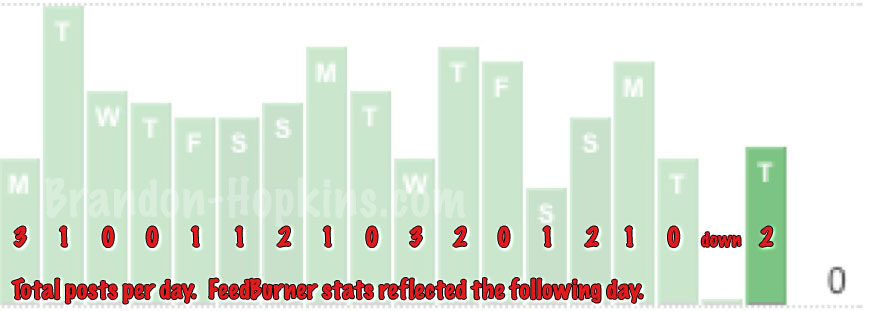
The picture below represents the last 3 weeks from one of my sites. FeedBurner updates stats daily, so the day after multiple posts should show more subscribers. Also in there is the day my server HDD crashed.

FeedBurner Stats

As you can see, when I post 3 posts, my subscribers shoot up. When I post one or two posts, my subscribers stay the same, or go up slightly. This is the data that showed me the optimal amount of posts for this blog. With some more trial and error I might find that my subscribers will be ok with 1 post on the weekends since this is a business-person oriented blog, most of which don’t work during the weekends.

What are the potential downsides for too many posts?

Too Many Posts

I have 9 total sites in my RSS reader (I use the Google personalize start page). Out of these 9 sites, I read every post from 7 of them. The two that I don’t? Digg / Technology and Slashdot. Why do I rarely read these updates? They post like a bazillion posts per day and I can’t keep up. If they were 3 updates per day, I would read all of them, every day. I understand Digg and Slashdot are more news outlets than blogs, but still the point remains.

Too Few Posts

About once a month I remove a feed and add a few feed to my RSS readers, know why? Too few posts per day. Most of the ones that get removed have 1 post every other day, 3-4 posts per week! I want something that is updated daily, atleast daily, preferrably multiple times per day.

The Perfect Posting Amount

So what is the perfect posting amount? The perfect posting amount is like the Perfect Storm. Three factors must come together in perfect harmony, answer these three questions and find the perfect posting amount for your blog:

1. Who are your readers?

Are they professionals? Are they high school students? Stay at home mothers? Obviouslly these three groups would read your blog at very different times.

Professionals – 7:45 a.m. – 8:15 a.m. then 11:45 a.m. – 1:15 p.m. then before the day ends at 4:45 p.m.

High School Students – 3:30 p.m. – Midnight

SAHM – Various times during the day, usually from 8 a.m. to 5 p.m.

2. What do they want to read?

Personally, I don’t care much about your life and what you did last night. I want to get from your blog what I expect to get. If your blog is a SEO blog, give me SEO. If it is about business marketing tips, give me some tips. I do, however, like to hear a personal voice. Shoemoney is great at this. Almost all of his articles are on target with what I expect, even the personal stuff is worth reading because it is all relevant to making money online.

3. How can you keep them?

If you are in my RSS reader, and want to keep me there, post frequently, post on topic, and post engaging headlines. If you are writing about a new tool you created for SEM (search engine marketing) you have multiple title options. “My Newest SEM Tool” or “Check Out My New Tool” or “Free Tool Helps You Move Up SERPS Easily“.

Which of those 3 headlines is most likely to get clicked on? Obviously #3.

So why do you want those RSS subscribers? If people are reading your blog daily, they will spread the word. Only people interested in your target niche will read your blog. They likely have their own blog, and they might post a link to you, they might send an email to their friends, the possibilities are endless, but only if you can capture more RSS subscribers.

If you can post the optimal amount for your blog, learn to comment effectively, a learn how to linkbait, you’re on the way to the top!

By |March 9th, 2007|SEO/SEM|3 Comments