Phone (Call or Text): 559-871-1613|brandonchopkins@gmail.com

Monthly Archives: April 2007

Someone’s Stealing My Content!

I just got a few trackbacks from a site that is using the same theme I’m using, and he is duplicating my content!

I emailed the lamer listed on the whois, Ricky Ford, and told him that the DMCA prevented content theft. I also emailed his host and GoDaddy, his registrar. GoDaddy is the only one who has responded.

Here is my email to him:

ATTN: Ricky Ford
808 W Mackenzie
Hobbs, NM 88240
505-631-9815

I don’t know why, but you seem to have stolen a few pages of my content for your site at ***(don’t want to link to the stolen content).

According to the DMCA ( http://en.wikipedia.org/wiki/DMCA) you are breaking the law by stealing my intellectual property.

I am also sending this to your host DimeNoc because DMCA Title II states that they will not be held responsible for theft if they, “promptly block access to allegedly infringing material (or remove such material from their systems) if they receive a notification claiming infringement from a copyright holder or the copyright holder’s agent.”

I will also send this to GoDaddy because I am sure they are not aware that you are using them to register domains in an attempt to steal content. Since they are an online service provider, they also fall under DMCA Title II and will be exempted from any further actions if they remove the content.

I hope this can end without further actions needing to be taken.

Brandon Hopkin
s

GoDaddy (whom I’ve already expressed my dislike for) emailed me their response:

Thank you for contacting the GoDaddy.com Spam and Abuse Department.

We are not the hosting provider for this site. We are the domain name registrar only. We have neither access to, nor jurisdiction over the content on this site.
The web hosting provider for this website is the company responsible for policing this content and is required to respond to Copyright complaints as outlined by the Digital Millennium Copyright Act (DMCA).

And then some more blah blah blah. Of course I responded (because I read Title II of the DMCA) and told GoDaddy:

The DMCA reads, “DMCA Title II, the Online Copyright Infringement Liability Limitation Act (“OCILLA”) creates a safe harbor for online service providers (OSPs, including ISPs) against copyright liability if they adhere to and qualify for certain prescribed safe harbor guidelines and promptly block access to allegedly infringing material (or remove such material from their systems) if they receive a notification claiming infringement from a copyright holder or the copyright holder’s agent.”

GoDaddy is an online service provider, that is now allowing the site *** to steal content.

Is GoDaddy not an online service provider?

So in my opinion anyone who is an online service provider is required (in order to hide behind the “safe harbor” guideline) is liable for “blocking” access or “removing” such material. GoDaddy could block that material by changing the nameservers.

GoDaddy has yet to respond and so has Ricky Ford and his host DimeNoc. His email address is listed as sales@vernalhost.com which seems to be just a hosting template.

We’ll see how this ends up, I really don’t want to have to get a lawyer to figure all of this out, but theft is theft.

Then again, as my wife reminds me, “Imitation is the sincerest form of flattery.” Then I remind her that theft is, “Illegal taking of another person’s property without that person’s freely-given consent.

UPDATE: All stolen content has been removed.  He is using someone elses RSS feed to duplicate their content, but that isn’t my issue anymore!
By |April 7th, 2007|News|4 Comments

How To: Have a $60 PG&E Bill for a 2,200 sq. ft. House

I’m not an expert, nor do I work for PG&E. I do however average $60 a month on my PG&E bill. In fact, I got last months bill, and it was $52 for my 2,200 sq. ft. house! Don’t leave just yet, I don’t have anything to sell, just some tips that will hopefully save you money next month!

I know it may sound weird, but I look forward to my PG&E bill every month. I enjoy opening it knowing that I am paying the same amount that I paid for my first apartment (550 sq. ft. total). On average, my PG&E bill runs about $60. Some months are in the $40 range, and others in the $70-80 range, but averaged it is around $60.

Just FYI, I have no propane. Stove and hot water heater are both gas. My wife cooks on the stove at least 3-5 times a week, and we always have plenty of hot water. I set the hot water heater to 8/10 (10 being hottest).

I’ve also approximated how much I think each of these tips will save you financially. If I’m wrong, leave a comment and let me know how much you think each of these actually will save. Most of the savings are based on using your heater and A/C less.

So here they are in my approximation of the best way to save money first:

1. Open windows early in the morning, shut them around 11 a.m. – Savings: $15/month.

When I get up in the morning at about 6:45 a.m., I open a window in our bedroom and one in the living room. I put a box fan in the bedroom window blowing out. It sucks cool air through the living room window all through the house and out the bedroom window.

At 6:45 our thermostat says between 70-80 degrees. Our thermostat is in the middle of the hallway and usually records about a 10 degree drop in temperature in about 15 minutes, depending on the weather outside. Once the day starts to heat up, usually around 11 a.m. in Central California, my wife shuts the windows. When I get home, the house is usually about 73 degrees. If my wife isn’t going to be home, I shut the windows before I leave at 7:45 a.m. The house only needs about 15 minutes to cool off when I’m running the fan. A whole house fan would make this even more effective.

2. Unplug items you don’t use – Savings $5/month.

I don’t know how much this helps, but I always unplug items when I’m not using them. For example, I have 3 laptops, when they’re done charging, I unplug the cable. That makes the little LED light go off.

We have a DVD player hooked up to our stereo and a Epson Powerlite Projector, when we’re done watching a movie, I turn off the stereo, and put the DVD player and projector away (both unplugged).

I don’t know how much power those little LEDs use, but I have about 20 of them all over the house in various electronics. Unplugging these devices might not even be worth my time, but it’s part of my routine.

We have an ‘L’ shaped hallway and have two nightlights with sensors to turn them off and on. They are regular incandescent bulbs…more LEDs would surely save some money there. Oh, we also only have about 3 compact flourscent bulbs in the house, that would reduce the bill as well.

3. Put up window coverings – Savings: $25/month.

We just finished putting up some blinds over our sliding glass door that leads to the back yard. They are just the cheapest faux-wood blinds that Home Depot sold. Total cost was about $100. I estimate that this would save at least $25 a month in cooling during the summer months.

The sliding door gets full sun for about 10 hours during the day. Find out which doors and windows get the most mid-day and afternoon sun, and cover those first, that is when the sun is hottest.

4. Wear appropriate clothing when at home – Savings: $10/month.

During the summer months, wear shorts and a t-shirt. During the winter wear pants and a light sweater (at least a long sleeve shirt). You’d be surprised what temperatures you are actually comfortable at if you are dressed appropriately.

You don’t have to wear a jacket when inside (although that would save more money), but don’t wear a bikini in the middle of winter and turn the heater up to 80 degrees.

5. Check for air leaks – Savings: $20/month.

Take a match, light it and hold the smoking remains near the bottom of your front door. If the smoke blows in or sucks out, you have an air leak problem. Air might also be leaking from the garage door, sliding door, windows, stove vents, fireplace flume, or anywhere else that leads outside.

My house is relatively new so I wasn’t able to find many air leaks. Our front door did blow the smoke inside, so I went to Home Depot again (I admit, I’m a Home Depotaholic), and bought a replacement strip for the bottom of the door. It was already cut to size and screwed in easily. No more air leaks at the front door.

You have to realize these air leaks are letting in the outside air 24 hours a day. And if you have 5 different spots leaking air 24 hours a day, that is a lot of outside air coming in.

6. Close doors to unused rooms – Savings: $10/month.

Our house has 3 bedrooms. One is the baby’s room, the other is just storage currently. We always keep the door to the 3rd bedroom closed. The boxes in that room don’t need to be heated and cooled with the rest of the house. I admit, going into that room in the winter is miserable, it seems to be 10-15 degrees colder than the rest of the house.

7. Shut some vents – Savings: $5/month.

My wife and I spend most of our time either in the living room/kitchen area, or in the bedroom. Because I know where we’ll be, I shut the air vents to the rooms we’re never in. The vents that are open are the 3 in our bedroom, 1 in our master bathroom, 1 in the kitchen, 2 in the living room, and 1 in the baby’s room.

I have 6 vents shut, 1 in the bathroom, 1 in the extra bedroom, 2 in the hallway and 2 in the sitting room. No reason to heat and cool rooms that nobody is in.

I know that this list is nowhere near complete. There must be at least 10 other ways that I could be saving money.

If you have a few tips of your own, post a comment and let me know!

By |April 5th, 2007|About Me, General|2 Comments

Free Niche Idea #4 – Network Monitoring Tool

Monitoring a network has never been easier than it is today, primarily because of the creation of more and more tools. These tools allow network administrators to optimize LANs and WANs, fix issues, detect problems, etc. Now, these tools can make you some money.

This small niche has a high payout and a lot of long-tail keywords. If you like writing reviews, this is the niche for you. Many of the keywords are product focused but could still be written without a review format. Since this is a technological field, you also have a chance of hitting it big and getting on the Digg front page.

Here are the vitals for “Network Monitoring Tool”

Keywords: Network Monitoring Tool
Competition: 293,000
Price per click: Adwords: $10.69
Search Volume: Overture: 704/month

A few of the long tail keywords could be network management tool, network security tool, network diagnostic tool, network marketing tool, network monitor tool, admin network security system tool.

I don’t know of any affiliate programs for companies that sell network monitoring tools, so Adsense will be your top earner right now. You may find an affiliate, and you will probably be one of the only affiliates in the area.

I would suggest that this niche website be created apart from any other site and not as a subdomain. It is pretty specific and would benefit from it’s own branding. Network administrators will hopefully bookmark your site and pass it around to other network and IT administrators.

Let me know what domains you buy and I’ll give you your first link here in this thread!

By |April 4th, 2007|Free Niche Websites, Make Money Online|0 Comments

Google Split Testing Adsense

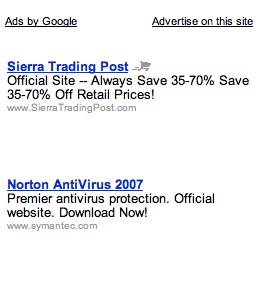
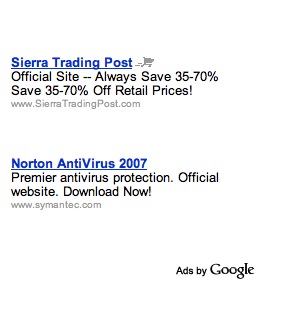
Ok, I’ve seen this in about 4 different situations now, all here on this blog. Look at the two adsense blocks below. They both came from this post about Namecheap coupons for April 2007.Adsense new formatAdsense old format

Notice the placement of the “Ads by Google” on the left ad. Also notice the lack of color. I don’t think the placement will matter much, but the lack of color will definitely help the ads blend into the layout of the page. For most of my sites, that is most important.

What do you think about these two different ads?

By |April 2nd, 2007|News|5 Comments